When Should You Use a Sniping Bot?

Understanding EA FC Market

Using a sniping bot is most effective during peak market hours — when EA floods the transfer market with tradeable packs. We’ll show you the key times to watch for, how to adapt to different market conditions, and what strategies work best when the market is slow and only a few cards are available to snipe.
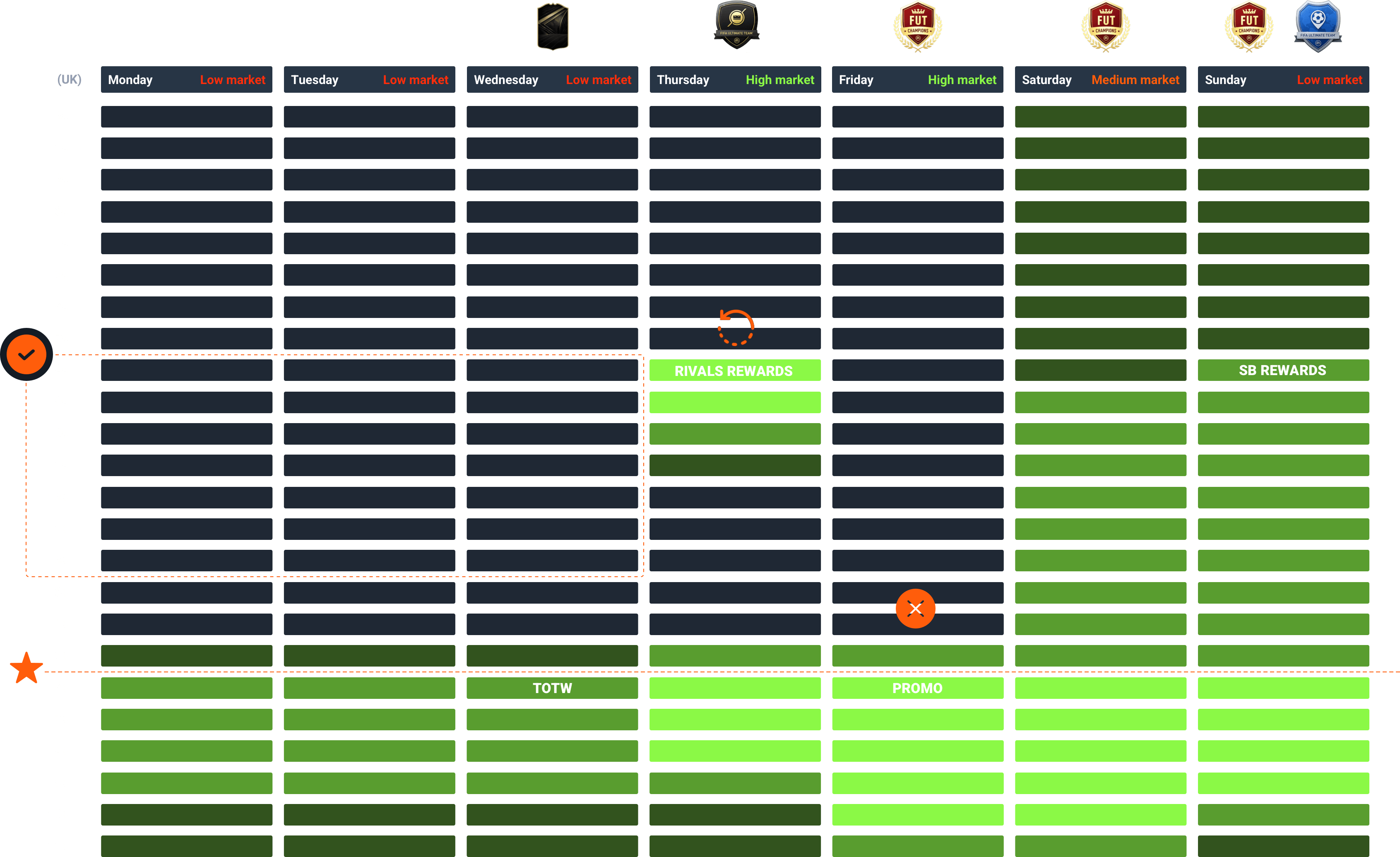
Most stable market time. During this time, the market is usually dry and stable — perfect for Lazy pricing and Chemstyle Trading.

Daily content time. At 6 PM (UK time), the daily content is released. If many tradeable cards appear, the market usually drops for 1–2 hours before stabilizing again. When strong content is released, supply increases and prices may fall, so it’s best to sell your cards before 6 PM.

Daily flip chance. On Thursday, Rivals rewards cause prices to drop in the morning as supply increases. By around 2 PM (UK time), the market usually recovers, making it a good time to sell the cards you bought earlier.

Possible crash. If a promotion is leaked in advance and looks promising, many players may panic-sell their teams, causing a significant market crash. Wednesday’s TOTW cards can drop heavily in price, so it’s best to avoid them. Promo cards also tend to fall throughout the weekend, so be cautious with them and avoid using Lazy Listing.

Frequently Asked Questions

You can find the answers to your FUT Simple Trader questions right here.

General Questions

FUT Simple Trader is a complete coin-making service for EA FC Ultimate Team, built on three core pillars: the Sniping Bot buys and sells underpriced cards for you, Trading Tips give you investment advice from professional traders in our Discord community, and the SBC Solver completes SBCs automatically at the lowest cost. On top of that, you collect FST Points in the Reward Zone. The Dashboard, with detailed statistics, brings it all together.
Trading on the EA FC transfer market takes a lot of time and is easy to get wrong. FUT Simple Trader automates it: Live Filters updated every minute tell you what to snipe, Auto Pricing sets the buy and sell prices automatically, and the built-in Safety Assistant warns you if a setting is risky. No trading or technical knowledge needed.
Results vary with market conditions, session length, filter choice and your budget, so we do not promise a fixed amount of coins. The best way to see what the tools do for you is the free 24-hour Premium trial, with no payment details needed.

EA FC Sniping Bot & Autobuyer

The Sniping Bot runs inside the official EA FC Web App and repeats a simple cycle faster than any human: it searches, compares the results with the maximum buy price, and instantly buys cards listed below market value. You load a Live Filter with one click, buying and listing are automatic by default, and prices are set by Auto Pricing. With Auto Trading, you can run it hands-free for up to 5 hours.
The risk of a ban for using a sniping bot is low as long as you follow the safety rules. Installing the app itself cannot be detected: it does not modify the Web App code, it only does the clicking for you. EA looks at behaviour patterns, so what matters is excessive market activity.
 
Too many searches can cause a soft ban (a temporary lock), and sustained overuse can lead to a Web App ban. Since EA FC 25, there have also been cases where EA restricted the entire transfer market, including console and the Companion App. Permanent bans are typically caused by coin transfers (buying or selling coins). Safe settings come preconfigured, and the built-in Safety Assistant warns you before a search if it sees a risky setting.
The app handles in-session breaks and search pace safely by default. Daily volume and human-like behaviour, however, are up to you:

  • Searches: under 5,000 per day (under 2,500 is even safer) and under 700 per hour.
  • Transactions: under 100 per day (failed bids count too), and no more than 20 on the same card.
  • Filters: run the same filter for no more than 100–150 searches in a row, and keep rotating.
  • Varied usage: don't search at the same time and in the same amounts every day, and take days off.
  • In-game activity: play matches and complete SBCs to keep your profile strong.
  • Web App settings: turn off Usage Sharing and Playtime tracking.
  • One tool: don't run another bot, SBC solver or Web App booster alongside it.
  • Cards to avoid: bronze, silver, evo and manager cards whose prices suddenly spiked.
 
You can find every rule in detail in the safety category of the Help Center.
No, you need neither trading nor technical knowledge. Live Filters tell you what to snipe, Auto Pricing sets the prices, and efficient, safe settings come preconfigured. A few thousand coins are enough to start. If you want to understand the market more deeply, Trading Tips and the trading strategies in the Help Center will help.
You can find the download links on the install page: Windows and macOS (Apple Silicon and Intel) desktop app, Chrome extension, iOS and Android app. You log in to the app with your FUT Simple Trader account and to the EA FC Web App as usual; we never ask for your EA login details. Step-by-step guides for every platform are in the Help Center.
Yes. The iOS and Android apps are not stripped-down versions: they include the full Sniping Bot, the SBC Solver and the Safety Assistant, plus the Dashboard in its own tab next to the Web App. For longer sessions, many users still prefer the desktop app, because the phone has to keep the app in the foreground, and beta features are only available on desktop.
On the Dashboard, in your browser or in the Dashboard tab of the mobile app. Every subscriber sees their own statistics: the Dashboard records your profit, sessions and transactions automatically. With Premium, the Stats Zone also shows the state of the market in real time and when it's worth sniping, and the Trending page shows which cards are moving right now.
Every guide lives in our public Help Center, from installation and your first session through filters and account safety to advanced trading strategies. The built-in AI assistant answers your questions around the clock, in any language. On Discord, you will find Trading Tips, the community and support tickets.

Trading & Investment Tips

Investment tips focus on short- and mid-term market fluctuations: you buy cards at a low price and sell them at a higher price a few hours or days later. The tips come from professional traders, with buy and sell prices and market analysis. On their own, they can grow your coin balance quickly, and combined with the Sniping Bot, you can also invest the coins the bot earns for you.
The amount of coins you can earn depends on market movements, your strategy, and the time and budget you have. Similar to real-life investments, a larger budget can lead to greater potential profits. Players who follow investment tips early in the game can reach their first million coins within the first week and use those coins for additional growth.
You can start trading with any budget. FUT Simple Trader provides investment tips for all budget levels. Naturally, the more you invest, the higher the potential for profit.
In the tip channels of our Discord server: regularly updated market analyses, buy and sell prices, and real-time advice from professional and TOP 100 traders, for console and PC. Your Discord role unlocks the channels, and you get it automatically once you connect your Discord account on the Subscriptions page of the Dashboard.

Reward Zone

The Reward Zone is the extra part of FUT Simple Trader on the Dashboard: you collect FST Points and redeem them in the Store. This is where you find your daily claim, your sniping streak, your badge collection (from Bronze to Legendary), your gifts and your Prediction Game rewards.
The Reward Zone gives you rewards at no extra cost. With the FST Points you collect, you can get subscriptions, the VIP Rank or profile cosmetics, so your daily activity directly lowers the price of the service. The streak and badges also help you build a consistent daily routine.
With the daily claim, correct Prediction Game predictions, your monthly subscriber gift (Pro: 100, Premium: 200 FST Points), Store promotions, seasonal events and community games on Discord. You collect rewards in the Reward Zone with the Claim button. If you need more points, you can also buy point packs with the Deposit button.
In the Prediction Game, you predict the exact results of real football matches, and every correct prediction earns FST Points. Entry to a season costs 150 FST Points, and Premium and VIP members enter for free. Boosters (1.5x, 2x, 3x) are free. The weekly TOP 10 and the best players of the season win extra prizes, even the next EA FC game. More details on the Prediction Game page.
In the Store, you can redeem them for monthly Pro and Premium subscriptions, the season-long Lifetime plan, Pro → Premium upgrades, the VIP and Beta Tester ranks, Fakebin notifications and profile cosmetics (banner skins, avatar frames). During special events, FC Coins and FC Points appear as well.
The FST Store is accessible via the Dashboard/Store page, where you can redeem your points and view the various rewards available.

Payment & Support

If you have not used the service, you can get a full refund within 30 days of your first subscription payment. Renewals and used subscriptions are reviewed case by case, and you can cancel at any time. Requests go through a Discord ticket. Read the full Refund Policy.
Yes, but only on one EA account at a time. You can switch whenever you like: simply log in to the Web App with the other EA account, there is nothing to link or unlink, and we never ask for your EA login details. If you want to trade on two EA accounts in parallel, you need two FUT Simple Trader accounts, each with its own subscription.
The fastest way is the Help Center and its built-in AI assistant, which answers 24/7 in any language. For account and payment issues, open a support ticket on our Discord server (in English). You can also reach us at info@futsimpletrader.com.
For business collaborations or partnerships, contact us at info@futsimpletrader.com or join our Discord server.
On our Discord server. This is where subscribers get Trading Tips, where community games and events happen, and where you can open a support ticket. Connect your Discord account on the Subscriptions page of the Dashboard so your Pro, Premium or VIP role appears automatically.