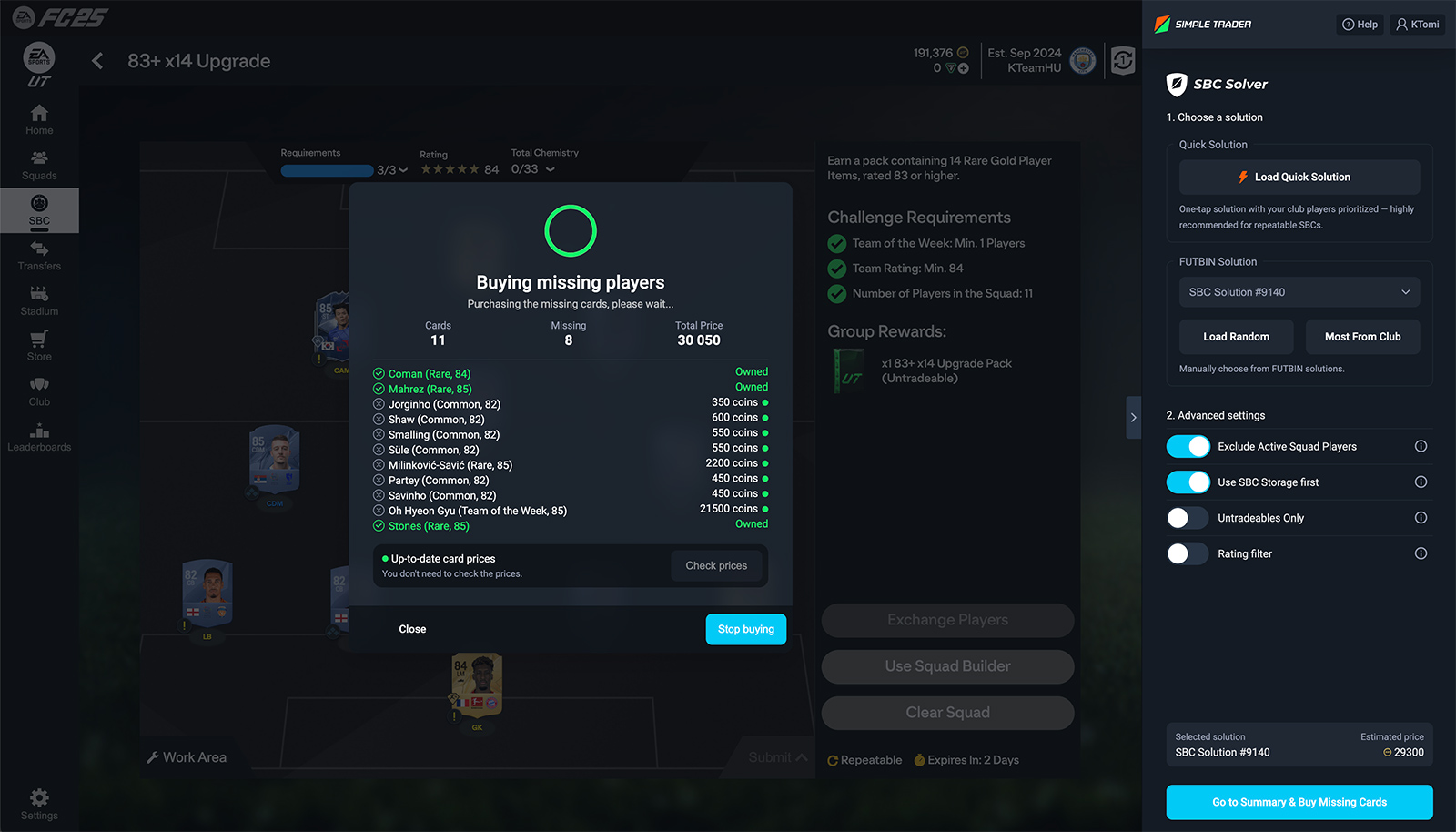
The SBC Solver automatically selects the most optimal squad combinations for you, saving you time and maximizing efficiency. With advanced filters, you can customize your preferences, and the system will even purchase the missing cards for you automatically. No more manual grinding – just smarter trading and faster SBC completions.
Quick SBC Solutions
Auto Build & Smart Buy
Build the best SBC squads in just one click. With advanced filters, the SBC Solver selects the optimal solutions and automatically purchases missing cards at the lowest market prices. Enjoy fast grinding, efficient completions, and smart trading — all fully automated.
Auto-complete SBCs with one click
Finds and buys cards at the lowest market price
Use filters like Rating, SBC Store, and more
Advanced SBC Support
Smart Solutions from FUTBIN
For challenging SBCs like Marquee Matchups or other advanced Squad Building Challenges, you can choose from top-rated FUTBIN solutions. The system automatically evaluates your club’s available players and picks the most efficient option based on what you already own.
Access curated FUTBIN solutions for tricky SBCs
Automatically adapts based on your club inventory
Ideal for SBCs like Marquee Matchups and more
Cross-Platform Access
Available on Mobile & Desktop
Access all features of SBC Solver anytime, anywhere. Whether you're on iOS, Android, Windows, macOS, or prefer using a Chrome Extension, our tools are fully optimized for every platform. Seamlessly trade, build SBCs, and snipe cards across all your devices.
The SBC Solver is a revolutionary tool for EA FC Ultimate Team players, making it possible to solve Squad Building Challenges (SBCs) quickly, easily, and efficiently. With just a few clicks, the app plans the most optimal squad for you and can even automatically purchase any missing cards from the market.
How It Works and What You Can Set
The SBC Solver reads the SBC requirements, scans your club, works out which slots need a market purchase, and returns the cheapest valid solution based on fresh market prices. For a popular SBC, this usually takes 10–30 seconds, and if several solutions are close to optimal, you can choose between them. The Buy missing button buys the missing cards at the lowest market price.
Exclude active squad: on by default, so your starting XI stays untouched.
Untradeables only / prefer untradeables: clears out your untradeable cards without selling them.
Commons only: keeps rare cards out of the fodder pool.
Fodder rating threshold: for example, only use 82+ cards from your club.
Special cards and SBC Storage: decide whether the Solver may use them.
On the Dashboard, SBC Solver purchases can be filtered separately, so they don't distort your sniping statistics. Every setting is explained in detail in the Help Center.
Advantages and Disadvantages
Advantages:
Time-saving: Complete challenges in seconds instead of minutes.
Cost-effective: Builds the cheapest optimal squad based on current market prices.
User-friendly: Simple, intuitive interface.
Automatic purchases: Missing players can be bought for you automatically.
Free trial: the 24-hour Premium Trial starts automatically on your first login, no coupon code needed.
Disadvantages:
Premium feature: after the trial, it requires a Premium Trader subscription.
Rare cards: Auto-purchasing may take longer for rare players.
Is Using SBC Solver Safe?
Using the SBC Solver is fundamentally safe, and installing or running the app does not carry any extra risks. However, the same precautions apply as with using a Sniping Bot: you should aim to mimic natural human behavior. This means not solving too many SBCs too quickly or making purchases at an unnatural pace.
For challenges that require bot-assisted purchases of missing players, the same security rules apply, which we have detailed in this article in the security section.
How SBC Solver Makes Life Easier
SBC Solver stands out because it doesn’t just suggest solutions — it does the hard work for you. Even if you have limited time to spend in EA FC Ultimate Team, you can still enjoy valuable SBC rewards without wasting hours browsing the transfer market or calculating solutions manually.
Why Choose FUT Simple Trader?
FUT Simple Trader stands out in the world of SBC solving apps with the most user-friendly design available. The SBC Solver is available on PC, Mac, Chrome, Android, and iOS, so anyone can easily use it from any device. Solutions can be loaded with just one click, with no complicated setup or difficult installation process required.
We also place a strong emphasis on safety:
Safe default settings and a built-in Safety Assistant that warns you about risky settings.
Detailed safety guides in the Help Center to help you use our services with minimal risk.
Our goal at FUT Simple Trader is to make your EA FC Ultimate Team experience faster, safer, and more enjoyable!
Summary
SBC Solver is more than just a shortcut — it's a real advantage for players who want to maximize their EA FC Ultimate Team rewards quickly, safely, and efficiently. Whether you're a beginner or a seasoned player, SBC Solver will save you time, coins, and effort while making your Ultimate Team experience much more enjoyable.
Help Center & AI Assistant
Learn everything about the app
Detailed guides for every feature, plus an AI assistant that answers your questions 24/7, in any language.
You can find the answers to your FUT Simple Trader questions right here.
General Questions
FUT Simple Trader is a complete coin-making service for EA FC Ultimate Team, built on three core pillars: the Sniping Bot buys and sells underpriced cards for you, Trading Tips give you investment advice from professional traders in our Discord community, and the SBC Solver completes SBCs automatically at the lowest cost. On top of that, you collect FST Points in the Reward Zone. The Dashboard, with detailed statistics, brings it all together.
Trading on the EA FC transfer market takes a lot of time and is easy to get wrong. FUT Simple Trader automates it: Live Filters updated every minute tell you what to snipe, Auto Pricing sets the buy and sell prices automatically, and the built-in Safety Assistant warns you if a setting is risky. No trading or technical knowledge needed. Together, the Sniping Bot and Trading Tips can bring you 1–6 million coins per month.
With the Sniping Bot, users typically earn between 50,000 and 200,000 coins per day, which adds up to 1–6 million coins per month. Results depend on session length, filter choice and market conditions (activity is higher at weekends, for example). Trading Tips results depend on your budget, and using both together brings the biggest profit. Treat these as typical results, not a guarantee.
EA FC Sniping Bot & Autobuyer
The Sniping Bot runs inside the official EA FC Web App and repeats a simple cycle faster than any human: it searches, compares the results with the maximum buy price, and instantly buys cards listed below market value. You load a Live Filter with one click, buying and listing are automatic by default, and prices are set by Auto Pricing. With Auto Trading, you can run it hands-free for up to 5 hours.
The risk of a ban for using a sniping bot is low as long as you follow the safety rules. Installing the app itself cannot be detected: it does not modify the Web App code, it only does the clicking for you. EA looks at behaviour patterns, so what matters is excessive market activity.
Too many searches can cause a soft ban (a temporary lock), and sustained overuse can lead to a Web App ban. Since EA FC 25, there have also been cases where EA restricted the entire transfer market, including console and the Companion App. Permanent bans are typically caused by coin transfers (buying or selling coins). Safe settings come preconfigured, and the built-in Safety Assistant warns you before a search if it sees a risky setting.
The app handles in-session breaks and search pace safely by default. Daily volume and human-like behaviour, however, are up to you:
Searches: under 5,000 per day (under 2,500 is even safer) and under 700 per hour.
Transactions: under 100 per day (failed bids count too), and no more than 20 on the same card.
Filters: run the same filter for no more than 100–150 searches in a row, and keep rotating.
Varied usage: don't search at the same time and in the same amounts every day, and take days off.
In-game activity: play matches and complete SBCs to keep your profile strong.
Web App settings: turn off Usage Sharing and Playtime tracking.
One tool: don't run another bot, SBC solver or Web App booster alongside it.
Cards to avoid: bronze, silver, evo and manager cards whose prices suddenly spiked.
No, you need neither trading nor technical knowledge. Live Filters tell you what to snipe, Auto Pricing sets the prices, and efficient, safe settings come preconfigured. A few thousand coins are enough to start. If you want to understand the market more deeply, Trading Tips and the trading strategies in the Help Center will help.
You can find the download links on the install page: Windows and macOS (Apple Silicon and Intel) desktop app, Chrome extension, iOS and Android app. You log in to the app with your FUT Simple Trader account and to the EA FC Web App as usual; we never ask for your EA login details. Step-by-step guides for every platform are in the Help Center.
Yes. The iOS and Android apps are not stripped-down versions: they include the full Sniping Bot, the SBC Solver and the Safety Assistant, plus the Dashboard in its own tab next to the Web App. For longer sessions, many users still prefer the desktop app, because the phone has to keep the app in the foreground, and beta features are only available on desktop.
On the Dashboard, in your browser or in the Dashboard tab of the mobile app. Every subscriber sees their own statistics: the Dashboard records your profit, sessions and transactions automatically. With Premium, the Stats Zone also shows the state of the market in real time and when it's worth sniping, and the Trending page shows which cards are moving right now.
Every guide lives in our public Help Center, from installation and your first session through filters and account safety to advanced trading strategies. The built-in AI assistant answers your questions around the clock, in any language. On Discord, you will find Trading Tips, the community and support tickets.
Trading & Investment Tips
Investment tips focus on short- and mid-term market fluctuations: you buy cards at a low price and sell them at a higher price a few hours or days later. The tips come from professional traders, with buy and sell prices and market analysis. On their own, they can grow your coin balance quickly, and combined with the Sniping Bot, you can also invest the coins the bot earns for you.
The amount of coins you can earn depends on market movements, your strategy, and the time and budget you have. Similar to real-life investments, a larger budget can lead to greater potential profits. Players who follow investment tips early in the game can reach their first million coins within the first week and use those coins for additional growth.
You can start trading with any budget. FUT Simple Trader provides investment tips for all budget levels. Naturally, the more you invest, the higher the potential for profit.
In the tip channels of our Discord server: regularly updated market analyses, buy and sell prices, and real-time advice from professional and TOP 100 traders, for console and PC. Your Discord role unlocks the channels, and you get it automatically once you connect your Discord account on the Subscriptions page of the Dashboard.
Reward Zone
The Reward Zone is the extra part of FUT Simple Trader on the Dashboard: you collect FST Points and redeem them in the Store. This is where you find your daily claim, your sniping streak, your badge collection (from Bronze to Legendary), your gifts and your Prediction Game rewards.
The Reward Zone gives you rewards at no extra cost. With the FST Points you collect, you can get subscriptions, the VIP Rank or profile cosmetics, so your daily activity directly lowers the price of the service. The streak and badges also help you build a consistent daily routine.
With the daily claim, correct Prediction Game predictions, your monthly subscriber gift (Pro: 100, Premium: 200 FST Points), Store promotions, seasonal events and community games on Discord. You collect rewards in the Reward Zone with the Claim button. If you need more points, you can also buy point packs with the Deposit button.
In the Prediction Game, you predict the exact results of real football matches, and every correct prediction earns FST Points. Entry to a season costs 150 FST Points, and Premium and VIP members enter for free. Boosters (1.5x, 2x, 3x) are free. The weekly TOP 10 and the best players of the season win extra prizes, even the next EA FC game. More details on the Prediction Game page.
In the Store, you can redeem them for monthly Pro and Premium subscriptions, the season-long Lifetime plan, Pro → Premium upgrades, the VIP and Beta Tester ranks, Fakebin notifications and profile cosmetics (banner skins, avatar frames). During special events, FC Coins and FC Points appear as well.
The FST Store is accessible via the Dashboard/Store page, where you can redeem your points and view the various rewards available.
Payment & Support
Monthly subscriptions bought on Whop or Patreon come with a 30-day money-back guarantee: if you do not generate a profit despite following our recommendations, or in special cases, we will refund your subscription fee. If you use the program for multiple days and generate a profit, or use a significant number of Live Filters, the guarantee no longer applies. Each request is assessed individually; you can request a refund in a Discord ticket.
Refunds are not available for lifetime (season) plans, pre-orders, FST Point purchases, or products bought in the Store with points or crypto.
Refunds are not granted in cases where the application becomes unavailable or limited due to factors beyond our control, including but not limited to: • external security or policy changes of EA FC Web App, • EA FC Web App discontinuation or restriction, • user account suspension, ban, or termination.
By using the application, you acknowledge and accept that usage is at your own responsibility. We take all reasonable measures to ensure safe and stable operation, but cannot guarantee uninterrupted availability under circumstances outside our influence.
Yes, but only on one EA account at a time. You can switch whenever you like: simply log in to the Web App with the other EA account, there is nothing to link or unlink, and we never ask for your EA login details. If you want to trade on two EA accounts in parallel, you need two FUT Simple Trader accounts, each with its own subscription.
The fastest way is the Help Center and its built-in AI assistant, which answers 24/7 in any language. For account and payment issues, open a support ticket on our Discord server (in English). You can also reach us at info@futsimpletrader.com.
For business collaborations or partnerships, contact us at info@futsimpletrader.com or join our Discord server.
On our Discord server. This is where subscribers get Trading Tips, where community games and events happen, and where you can open a support ticket. Connect your Discord account on the Subscriptions page of the Dashboard so your Pro, Premium or VIP role appears automatically.